
■はじめに
こんにちは。
今回はHinemos内部で発生するイベントであるINTERNALイベントの出力先を変更する方法をご紹介いたします。
INTERNALイベントの出力先は、デフォルトでは監視履歴パースペクティブの監視履歴[イベント]ビューに出力され、出力先は他にsyslog、メール、コマンド、hinemos_internal.logに設定することが可能です。
INTERNALイベントの出力先は、Hinemosクライアントのメンテナンスパースペクティブのメンテナンス[Hinemosプロパティ]ビューで設定を変更します。
今回はHinemos ver.7.1.1 Linux版Webクライアントにて、Hinemosマネージャの動作をsyslog通知に変更する方法を例にご説明したいと思います。
1.デフォルトでの通知方法
はじめに、デフォルトではマネージャが停止・起動した際に以下のように監視履歴[イベント]ビューにINTERNALイベントが出力されます。

2.通知先の追加設定
次に、Hinemosマネージャの動作をsyslog通知にするための設定をします。
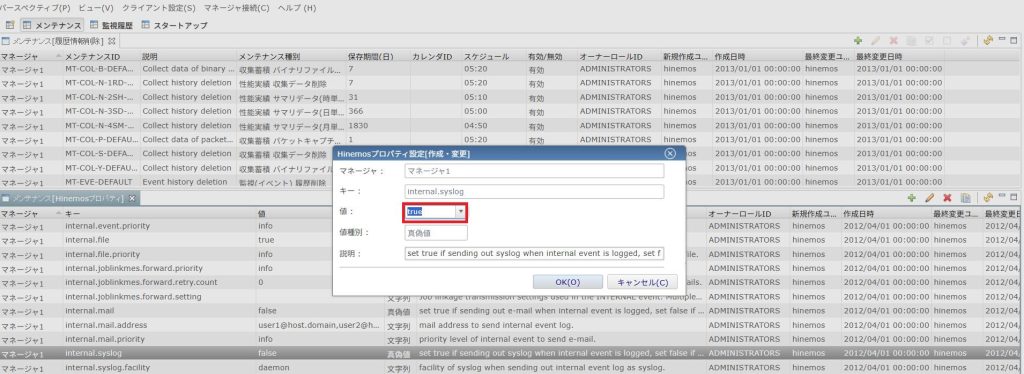
HinemosWebクライアントにてメンテナンスパースペクティブを開き、メンテナンス[Hinemosプロパティ]ビューの以下のinternal.syslogパラメータにより、syslogの出力有無、出力する通知の重要度、送信ホスト、ポート、facility、severityを設定することができます。
・internal.syslog
INTERNALイベントをsyslogで出力するかを真偽値で設定します。
INTERNALイベントのsyslog通知をを有効にするため、「true」を設定します。
・internal.syslog.priority
syslogにて通知するINTERNALイベントの重要度を設定します。
選択肢:「危険(critical)」、「不明(unknown)」、「警告(warning)」、「情報(info)」
設定した重要度以上のINTERNALイベントが通知されます。
重要度の優先順は、「危険 > 不明 > 警告 > 情報」となります。
今回通知させたいINTERNALイベントは「情報」のイベントなので「info」を設定します。
・internal.syslog.host
INTERNALイベントをsyslog送信するホストのIPアドレスを指定します。コンマ区切りで複数のアドレスを指定することが可能です。
・internal.syslog.port
INTERNALイベントをsyslog送信するポートを指定します。競合の起きないようご注意ください。
今回はデフォルト値に設定しました。
・internal.syslog.facility
INTERNALイベントのsyslog送信におけるfacilityを設定します。
今回はデフォルト値に設定しました。
・internal.syslog.severity
INTERNALイベントのsyslog送信におけるseverityを設定します。
今回はデフォルト値に設定しました。
3.変更結果
以下のコマンドにてマネージャを停止させ、INTERNALイベントを発生させます。

/ver/log/messagesを確認してみると、以下のようにINTERNALイベントの内容が出力されていることが確認できました。

■おわりに
INTERNALイベントをsyslog通知させるメリットとしては、今回例示したHinemosマネージャが停止した際のINTERNALイベントは、マネージャを再度起動させなければクライアント上から確認できないですが、syslogでの通知を有効にすれば停止時にすぐ通知を受け取ることが可能です。
ほかにも、メモリが逼迫した際のINTERNALイベントなどは、Hinemosの動作が正常に行われない場合でもsyslog通知することでHinemos外から確認することが可能になります。
以上、簡単でしたが、INTERNALイベントの出力先の変更についてのご紹介でした。


 Xをフォローする
 メルマガに登録する